
User Activity Productivity Monitoring
Understanding how company technology is being used can help organizations improve security, productivity, compliance, and technology planning.
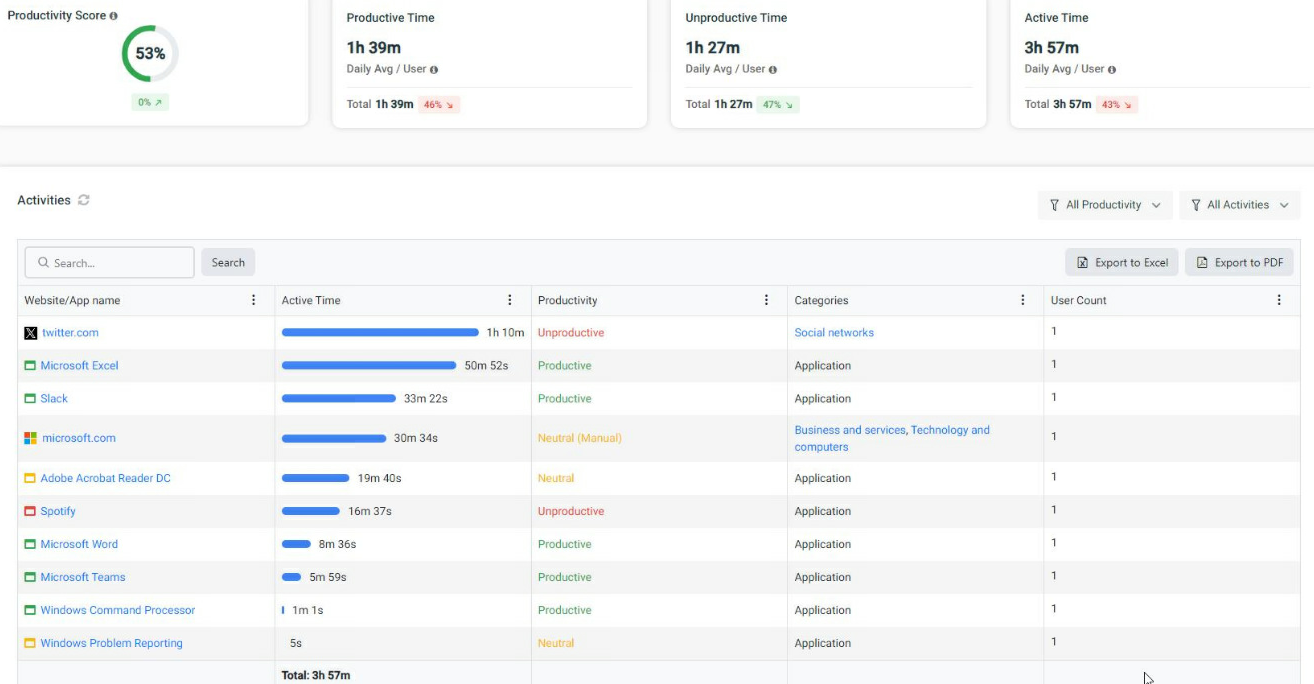
ProCirrus User Activity Monitoring provides centralized reporting across managed endpoints, giving authorized administrators and managers visibility into website activity, application usage, active and idle time, login activity, and other user activity.
What Our User Activity Monitoring Service Does
A lightweight agent installed on supported endpoints collects activity information and makes it available through centralized dashboards and reports.
The service can provide visibility into:
Website activity, including sites visited and time spent
Application usage and active time by application
Active and idle computer time
User login and session activity
Bandwidth and resource usage
Online services and web applications being accessed
Activity trends by user, department, or group
This information can be reviewed at an organization-wide level or narrowed to specific users or groups when additional detail is required.
Website and Application Reporting
User Activity Monitoring provides detailed reporting on how websites and applications are being used.
Organizations can see which applications employees use most frequently, how much active time is spent in those applications, and which web services are being accessed from managed systems.
This can help identify:
Frequently used applications
Software that may be licensed but rarely used
Unapproved web applications or services
Changes in technology usage over time
Unusual or unexpected activity
Active and Idle Time
The service can distinguish between active computer use and periods of inactivity.
This provides another layer of visibility into endpoint usage and can help organizations better understand work patterns across remote, hybrid, and office-based users.
Active and idle time should be viewed as operational information rather than as a standalone measure of employee performance, since legitimate work may occur away from the computer.
Screenshot Monitoring
When greater visibility is required, screenshot monitoring can also be enabled for selected users or circumstances.
Screenshots can provide additional context during:
Security investigations
Policy reviews
Internal audits
Compliance investigations
Suspected misuse of company systems
Screenshot monitoring can be limited or disabled based on an organization's internal policies and monitoring requirements.
Automated Reports and Alerts
Activity information does not need to be reviewed manually each day.
Reports can be scheduled and delivered automatically to designated administrators or managers, while alerts can help identify activity that may require additional review.
This allows organizations to maintain ongoing visibility without continuously monitoring a reporting console.
Common Uses
ProCirrus User Activity Monitoring can support:
Workforce and technology utilization reporting
Software-license optimization
Acceptable-use policy verification
Remote and hybrid workforce visibility
Security