
INSIGHTS
A searchable library of practical guidance on managed IT, cybersecurity, cloud, applications, and modern operations for professional firms.
FEATURED INSIGHTS
Firms with meaningful security, compliance, integration, and business-continuity requirements still need a managed ecosystem around their applications, users, data, identity, networks, and devices. A private managed-services cloud provides that operating layer.
AI is a powerful tool and firms need to adopt AI within the same security, privacy, and governance framework that applies to the rest of their technology environment.
A professional firm’s compliance posture depends on the entire technology environment, not on whether a single application, data center, or service provider is compliant.
LATEST INSIGHTS
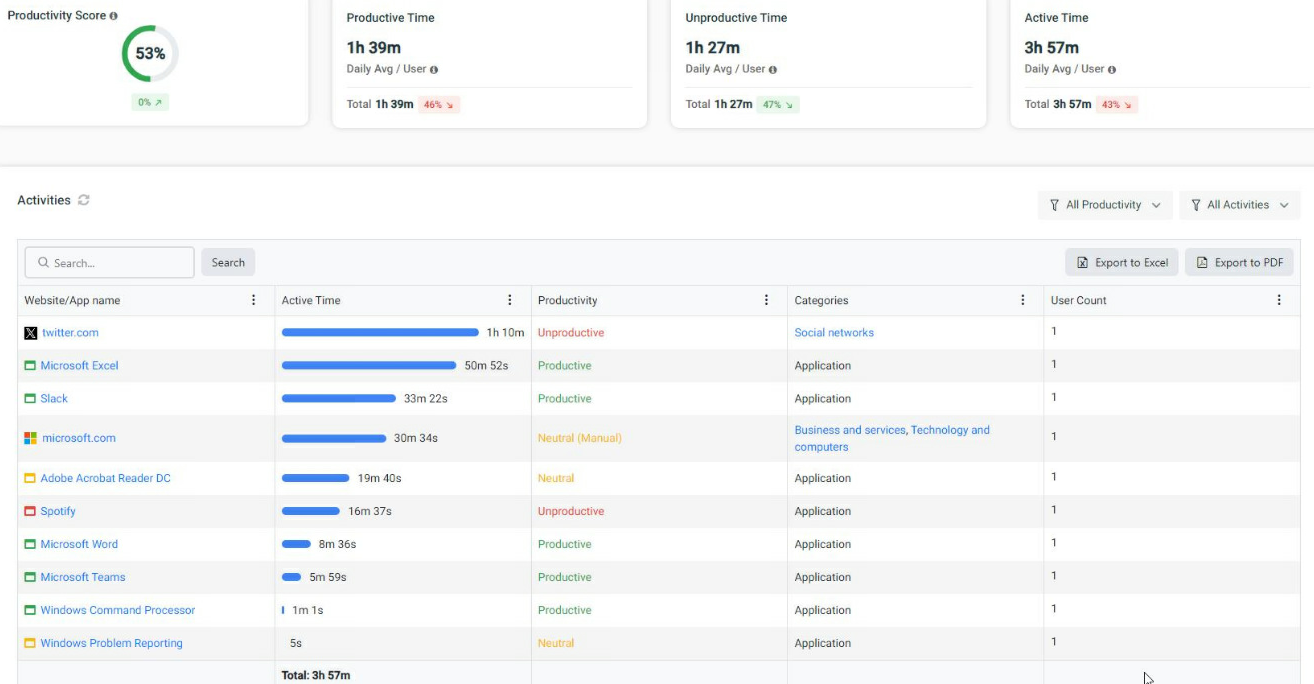
ProCirrus User Activity Monitoring provides centralized visibility into website activity, application usage, active and idle time, and endpoint behavior to support security, compliance, and technology oversight
Data Loss Prevention helps protect sensitive information by monitoring and controlling how data is accessed, copied, shared, uploaded, or moved across endpoints and servers.
How firms can connect Microsoft Copilot and other AI models to internal knowledge while preserving security, permissions, and control.
Multifactor authentication, single sign-on, and identity management are related, but they solve different problems Together, they help answer three basic questions: Who is the user? How do we verify them? And what are they allowed to access?
Endpoints—laptops, desktops, and mobile devices—are where users actually interact with the firm’s technology. They are also one of the most important security boundaries in the environment.
Yes. ProCirrus can manage local or hybrid environments when a firm has a specific reason to keep infrastructure onsite. A local model can work well, but firms should understand that it is a different architecture with different responsibilities and economics.
Professional firms are increasingly asked to prove that appropriate security controls are in place. A strong managed IT provider should help the firm answer those questions with documented controls, supporting evidence, and a clear understanding of who is responsible for each part of the environment.
ProCirrus contractually stipulates that client data belongs to the client. The firm retains ownership of its data while ProCirrus manages the infrastructure, security, backup, access, and services surrounding it.
ProCirrus uses layered backups, production snapshots, encrypted replication, and geographically redundant U.S. data centers to provide multiple recovery options depending on what went wrong and how quickly the firm needs to recover.
A typical ProCirrus onboarding takes approximately 60 days and is designed around preparation rather than a prolonged transition. Applications, users, data, vendors, integrations, security requirements, and infrastructure are identified and prepared in advance, with the final production cutover generally occurring over a weekend
Law firms rarely run on a single application or technology model. A typical environment may include traditional server-based legal software, SaaS applications, Microsoft 365, document management systems, web applications, locally installed tools, and specialized industry software—all working together.
Document management is about more than where files are stored. A strong document-management strategy should help users organize, find, secure, version, collaborate on, retain, and recover the documents that make up the firm’s work product.
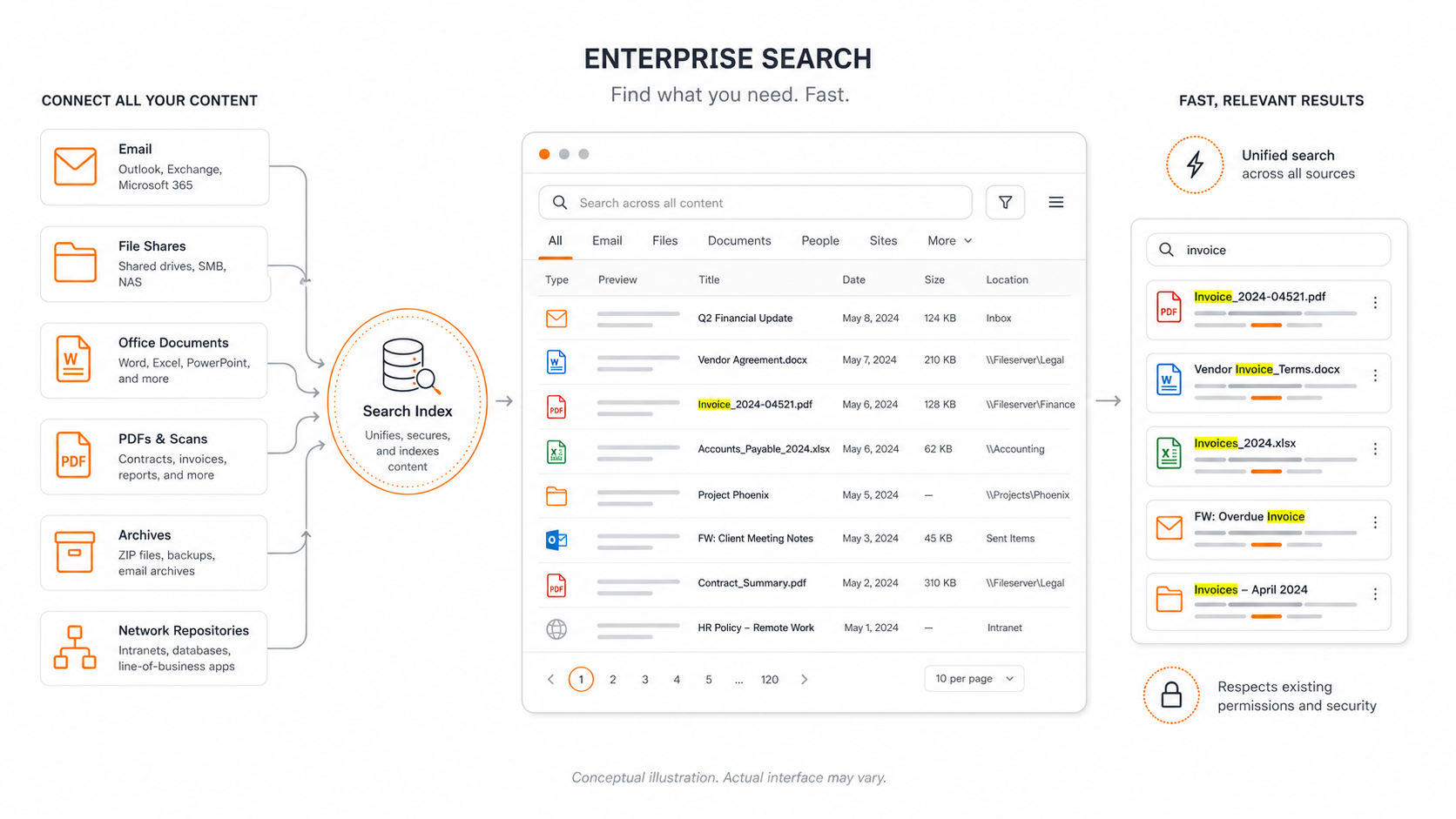
Large document repositories, file servers, Outlook archives, network shares, public folders, and years of accumulated business information can expose practical limitations around indexing, search speed, search scope, and result consistency. Enterprise search addresses that problem by creating a broader, purpose-built index across the locations where firm information actually lives.
Because identity is so central to the modern technology environment, firms need a recovery plan for more than email and files. If identity data is deleted, corrupted, misconfigured, or otherwise unavailable, users may lose access to the systems they depend on even when the underlying applications are still running.
Data Loss Prevention, or DLP, is designed to help prevent sensitive information from leaving an organization in ways that violate security, privacy, or business policies.
Traditional antivirus was built primarily to recognize known malicious files using signatures. Modern endpoint protection goes further by using machine learning, behavioral analysis, exploit prevention, and attack indicators to identify both known and previously unseen threats.
Firms with meaningful security, compliance, integration, and business-continuity requirements still need a managed ecosystem around their applications, users, data, identity, networks, and devices. A private managed-services cloud provides that operating layer.
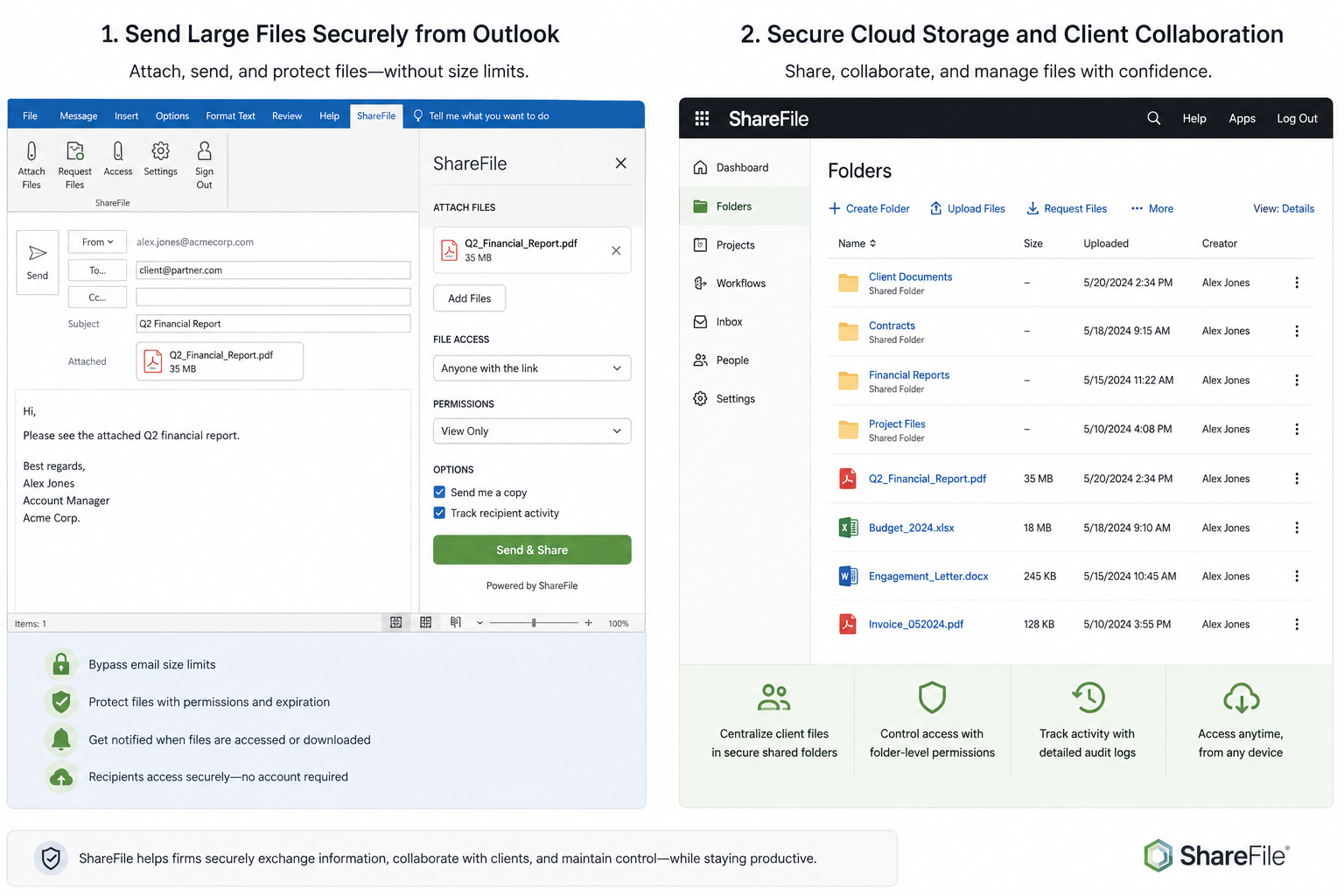
ShareFile provides that secure collaboration layer. It combines encrypted file transfer, large-file delivery, shared cloud folders, client access, permissions, activity tracking, and related workflow tools in one managed platform.
Email remains one of the most common ways attackers target professional firms. Microsoft 365 provides important native protections, but firms with higher security and compliance requirements often need an additional managed security layer around email.
Zero Trust application control adds another layer by changing the default assumption: instead of allowing software to run unless it is known to be dangerous, only approved applications, scripts, and processes are permitted to execute.
Managed Detection and Response, or MDR, adds an active human response layer to cybersecurity. Instead of simply generating alerts, MDR continuously monitors for suspicious activity, investigates potential threats, and takes action when necessary.
Security Information and Event Management, or SIEM, provides centralized collection and analysis of security-related logs and events across an organization’s technology environment.
AI is a powerful tool and firms need to adopt AI within the same security, privacy, and governance framework that applies to the rest of their technology environment.
Microsoft 365 is often treated as a standalone SaaS subscription, but for most professional firms it is a core part of the operating environment.
A professional firm’s compliance posture depends on the entire technology environment, not on whether a single application, data center, or service provider is compliant.
Fully managed IT should mean more than help desk support or managing a collection of individual tools. A complete managed IT model brings together users, devices, identity, applications, networks, infrastructure, cybersecurity, backup, compliance, and ongoing support under one accountable operating model.