
What is ShareFile, and when should a professional firm use it?
Email is convenient, but it is not always the right tool for exchanging large or sensitive files. Professional firms often need a more controlled way to send documents externally, receive files from clients, and maintain shared access to working folders.
ShareFile provides that secure collaboration layer. It combines encrypted file transfer, large-file delivery, shared cloud folders, client access, permissions, activity tracking, and related workflow tools in one managed platform.
Securely sending large or sensitive files
One of ShareFile’s most useful capabilities is replacing traditional email attachments with secure links.
Users can send large files without the normal attachment-size limitations of email while applying controls around who can access the information. Depending on configuration, links can require authentication, include expiration settings, restrict access, and provide visibility into when files are accessed or downloaded.
Files are encrypted during transfer and while stored in the ShareFile environment, making it a more appropriate method for exchanging sensitive business information than relying on ordinary email attachments.
Integrated directly into Outlook
ShareFile integrates with Microsoft Outlook so users can send secure files without leaving the email workflow they already use.
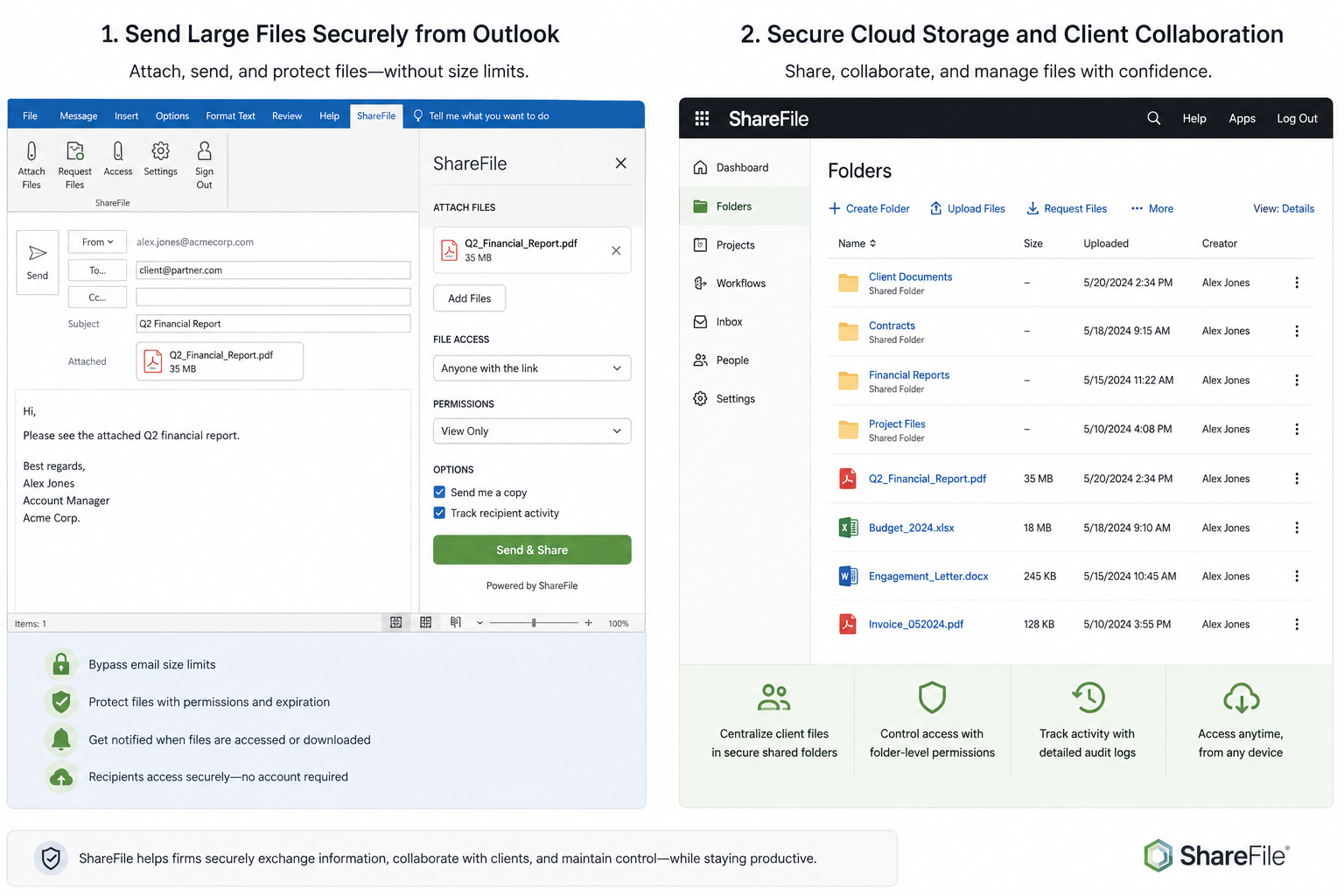
Instead of attaching a large or sensitive document directly to an email, the Outlook integration can replace the attachment with a secure ShareFile link. Users can apply sharing controls while composing the message, and recipients access the file through the secure ShareFile service.
That makes secure file delivery easier to adopt because users do not need to switch applications or follow a separate process every time they need to send something securely.
ShareFile can also support secure file requests, allowing users to invite a client or other outside party to upload documents without relying on ordinary email attachments.
Shared cloud folders for clients and teams
ShareFile is more than a file-delivery service.
Firms can create shared cloud folders where authorized employees, clients, vendors, or other outside parties can access information relevant to them.
Permissions can control who may view, download, upload, edit, or share information. This gives firms a structured way to collaborate externally without exposing internal file systems or relying on repeated email exchanges.
For ongoing client or vendor relationships, shared folders can be much more efficient than continually sending files back and forth.
Receiving files securely
ShareFile can also be used to collect information from clients and other outside parties.
Instead of asking someone to email sensitive documents, a firm can provide a controlled location where files can be uploaded securely.
This is useful for financial records, case documents, supporting documentation, reports, and other information that should not be moving through ordinary email attachments.
Security and control around shared information
When information is being shared outside the firm, visibility and control matter.
ShareFile provides capabilities such as:
encrypted file storage and transfer
user and group permissions
folder-level access controls
secure sharing links
link expiration and access restrictions
activity and access logging
download notifications
file versioning
multifactor authentication and account controls
These controls help the firm understand not only where information was sent, but also who was permitted to access it and how it was shared.
More than file sharing
Depending on the firm’s requirements and service level, ShareFile can also support client portals, document requests, electronic signatures, workflow automation, approvals, and other document-management functions.
Not every firm needs every feature. For many professional firms, the core value starts with something simpler: a secure, practical way to send, receive, store, and share files with people outside the organization.
The ProCirrus approach
ProCirrus provides and manages ShareFile as part of the broader technology environment for firms that need secure external file exchange and cloud-based collaboration.
Integrated directly with Outlook, it can be used for one-time encrypted file delivery, transferring files too large for email, securely collecting documents from clients, or providing ongoing access to shared cloud folders.
Because ProCirrus manages the surrounding user, identity, security, support, and application environment, ShareFile can be incorporated into the firm’s broader workflow rather than treated as another isolated cloud application.
The objective is straightforward: make it easy for users and clients to exchange information while maintaining the security and control professional firms require.