
Why enterprise search is different from Windows Search
Windows Search is useful for everyday desktop use, but professional firms often work with far more information than a typical workstation search was designed to handle.
Large document repositories, file servers, Outlook archives, network shares, public folders, and years of accumulated business information can expose practical limitations around indexing, search speed, search scope, and result consistency. Enterprise search addresses that problem by creating a broader, purpose-built index across the locations where firm information actually lives. Lookeen specifically positions its enterprise platform around centralized indexing, Citrix/terminal-server compatibility, network and file-server search, Outlook and Exchange content, and effectively unlimited index size.
Why Windows Search can become limiting
Windows Search is designed primarily around the local Windows experience. As the amount of information grows or expands across network locations, archives, and shared systems, users can encounter slower searches, incomplete indexing, or the need to adjust Windows indexing settings to include additional locations.
That can become especially noticeable in professional environments where a user may need to search years of documents or correspondence rather than a relatively small collection of local files. Lookeen notes that searches through Windows and Outlook can become time-consuming with large data sets and that changes to Windows indexing settings can themselves create performance issues.
The issue is less that Windows Search is inherently poor and more that enterprise information retrieval is a different workload from ordinary desktop search.
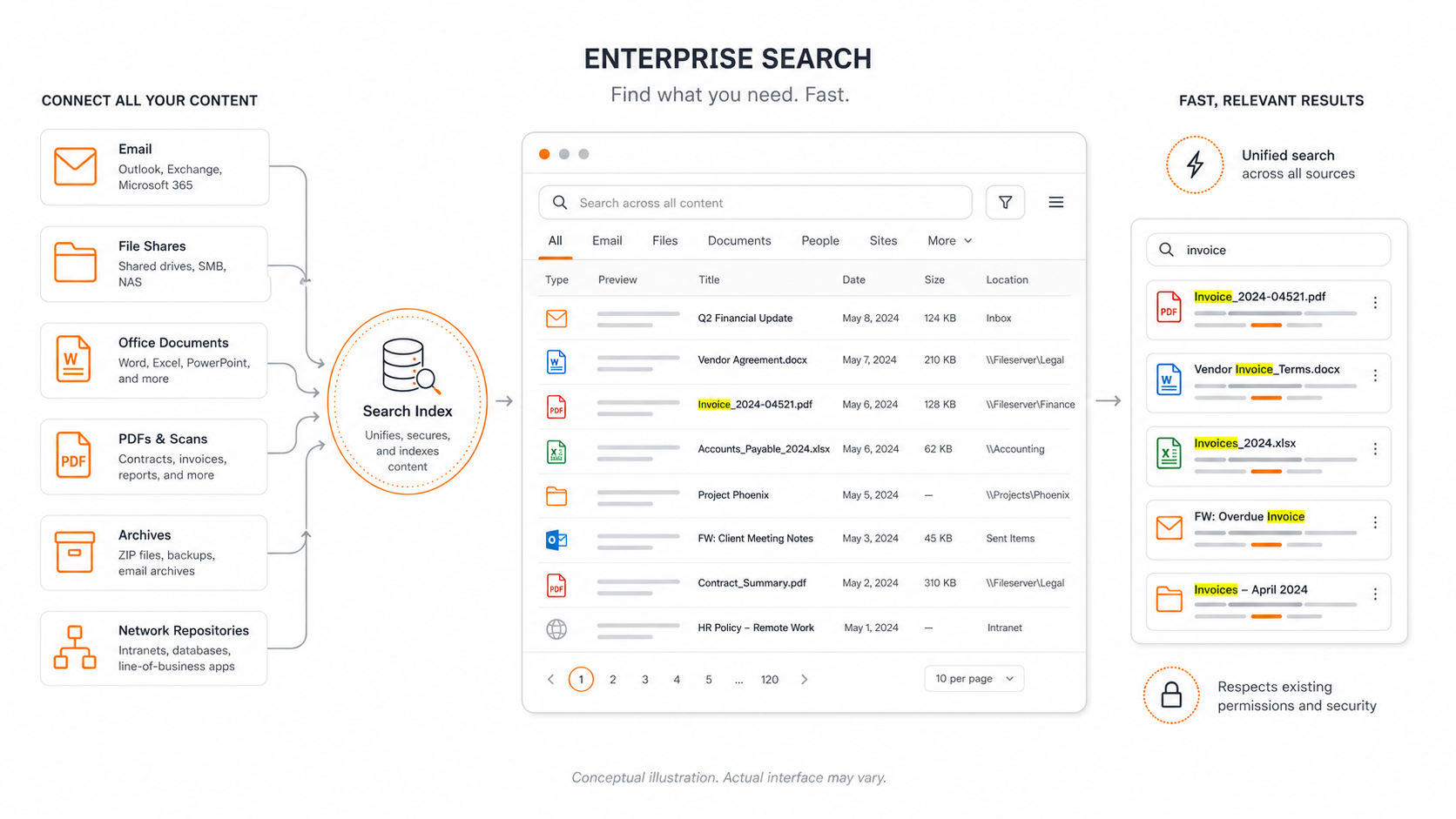
Enterprise search builds a broader index
A dedicated enterprise-search platform can continuously index information across multiple approved sources so users are not waiting for each location to be searched independently.
Depending on configuration, that can include:
file servers and network folders
desktop files
Microsoft Outlook email
email attachments
Exchange folders and archives
PDFs and Microsoft Office documents
scanned documents through OCR
shared indexes containing large historical repositories
The result is a searchable index designed specifically for fast retrieval across large collections of business information.
Search speed matters when information becomes large
Search is a productivity issue.
A user who knows that a document or email exists but cannot quickly find it may spend several minutes navigating folders, trying different keywords, opening Outlook archives, or asking someone else where the information was stored.
Enterprise indexing performs much of that work in advance. Instead of examining thousands or millions of individual items when the user initiates a search, the system searches a prepared index and can return results much more quickly.
This becomes increasingly valuable as firms accumulate years of documents and email.
Large indexes require a different architecture
Another practical difference is scale.
Enterprise search can be designed around indexes containing very large quantities of information rather than relying solely on each user's local Windows index. Lookeen states that its indexes do not impose a maximum archive-size limit and can index archives containing terabytes of information. Its server architecture also supports centrally stored indexes for file systems, mailboxes, and other shared information sources.
For a professional firm, this means historical information does not necessarily have to become progressively harder to find simply because the underlying repository has grown.
Search across documents and email together
One of the largest productivity benefits is the ability to search more than one information source through the same interface.
A user looking for information about a client, matter, transaction, or project may not remember whether the relevant information was contained in a Word document, PDF, spreadsheet, email, attachment, or archived mailbox.
Enterprise search can index these sources together so the user searches for the information, rather than first having to remember where it was stored. Lookeen supports simultaneous search across documents, Outlook data, Exchange content, network locations, and related repositories.
Search should respect permissions
Making more information searchable should not mean making more information accessible.
In an enterprise environment, centralized search should preserve the underlying access controls so users only receive results for information they are authorized to access.
This is particularly important for professional firms where repositories may contain confidential client, matter, financial, HR, or other restricted information.
Enterprise search therefore has to be implemented as part of the firm's broader identity and permissions model rather than simply creating one unrestricted index of everything.
Search becomes more important as data grows
Organizations naturally accumulate information over time.
The challenge is no longer simply storing it. The challenge is being able to retrieve the right information when someone actually needs it.
A well-designed enterprise-search environment can make years of documents and correspondence usable without requiring employees to understand the underlying folder structure or remember exactly where something was saved.
The ProCirrus approach
ProCirrus offers enterprise search for firms that need faster and more comprehensive retrieval than traditional Windows Search provides.
The service can index large document repositories, network file systems, Outlook information, archives, and other approved sources and make that information searchable within the ProCirrus environment. The technology is compatible with Citrix and terminal-server environments, making it particularly well suited to ProZone.
For firms with large or long-established data repositories, enterprise search can dramatically improve the practical usefulness of information they already own.
The objective is simple: users should spend their time using information, not trying to remember where it was stored.